

Have you ever felt stuck trying to figure out how to make a CV that actually helps you get the job you want?
You’re not alone.
Creating a CV (curriculum vitae) can feel overwhelming, but it’s one of the most important steps in getting hired.
A great CV shows who you are and why you’re the right fit for the job. That’s why we’re here, to help you every step of the way.
In this guide, we’ll walk you through how to make a CV, from what to include to how to make it stand out. It’s time to create a CV that gets you noticed.
Let’s do this together!
Table of Contents
Ready to start?
Get ready to learn how to make an awesome CV (curriculum vitae). We’re here to guide you every step of the way!
What is a CV for a job application?
A curriculum vitae (CV) is a detailed list that shows off your work experience, education, skills, and anything else that could help you get a job.
It tells the employer or the person hiring about all the cool stuff you’ve done in your life that makes you a great fit for the job you want.
You put in things like your name, contact info, the places you’ve worked before (like part-time jobs or internships), what you studied in school, any special skills you have (like languages or computer skills), and sometimes a bit about your hobbies or interests.
Remember, the main goal of a CV (curriculum vitae) is to impress the boss and show them why you’re the perfect person for the job!
How to Make a CV: Step-by-Step
You can create a CV (curriculum vitae) by following a few simple steps. Here’s a step-by-step guide to help you through it:
Step 1: Gather Information
Start by collecting all the necessary information you’ll need to include in your CV (curriculum vitae):
- Personal Information: Name, contact details (phone number, email address), and location.
- Objective or Personal Statement: A brief summary of your career goals or a statement about yourself.
- Education: List your educational qualifications, including schools attended, degrees earned, and any relevant certifications or courses.
- Work Experience: Detail your work history, including job titles, company names, dates of employment, and a description of your responsibilities and achievements in each role.
- Skills: Highlight both hard skills (technical abilities) and soft skills (communication, teamwork, leadership, etc.) that are relevant to the job you’re applying for.
- Additional Sections: Include sections such as awards, volunteer experience, publications, languages spoken, or any other relevant information.
Step 2: Choose a CV Format
- Select a format that best suits your background and the job you’re applying for.
- Common formats include chronological (listing work experience in reverse order), functional (emphasizing skills over work history), or a combination of both.
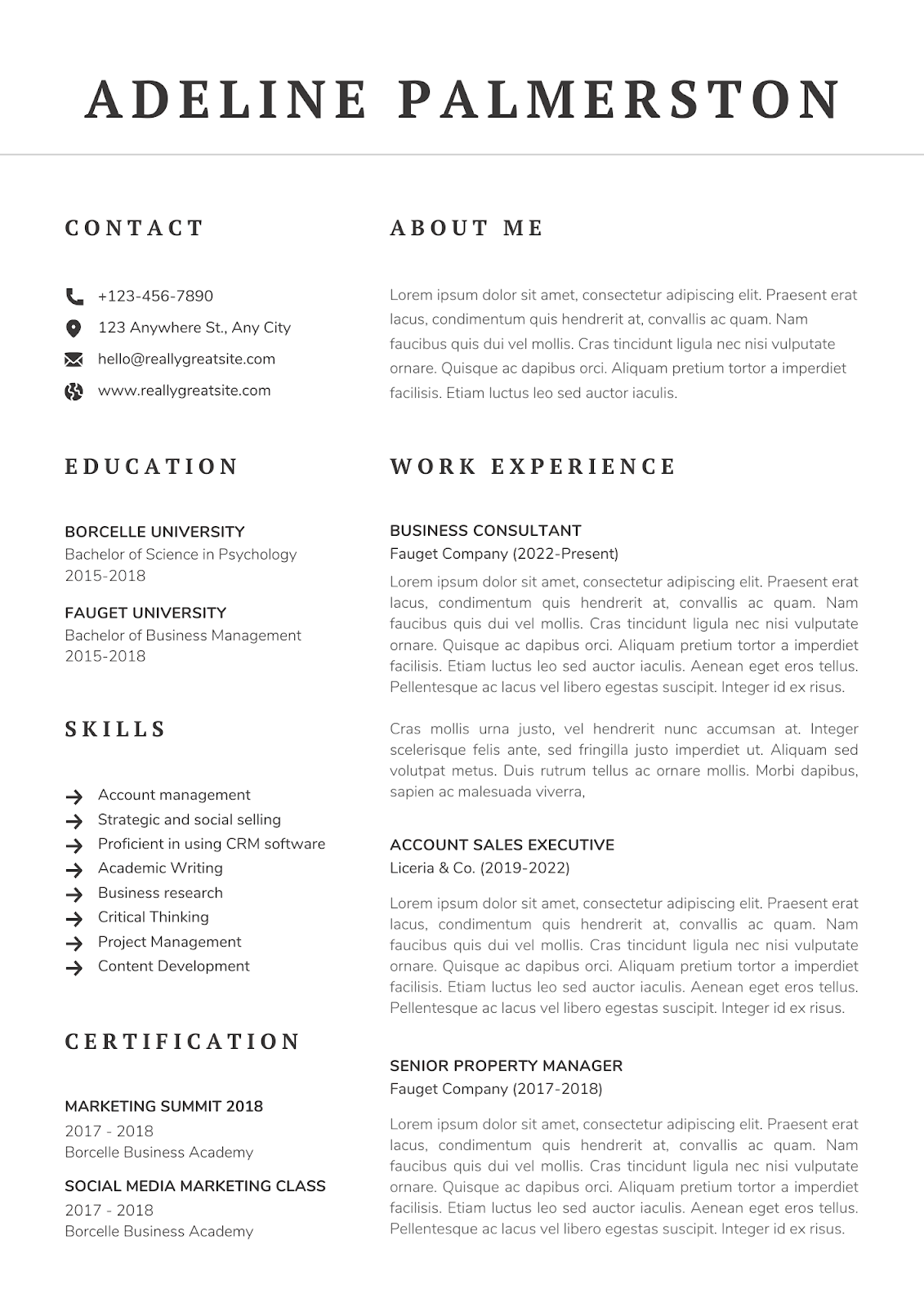
Step 3: Organize Your CV
Structuring your CV in a clear and organized manner is crucial:
- Header: Include your name and contact information prominently at the top.
- Introduction: Write a brief personal statement or objective (optional).
- Education: List your educational background in reverse chronological order (most recent first).
- Work Experience: Detail your work history with job titles, company names, dates, and responsibilities.
- Skills: Highlight relevant skills, both technical and soft skills.
- Additional Sections: Add any additional relevant sections (certifications, languages, etc.).
Here’s an example:
Step 4: Write Your CV Content
- Craft concise and impactful descriptions for each section.
- Use bullet points to highlight responsibilities, achievements, and skills.
- Customize your content to match the job description and emphasize your strengths that align with the position.
Step 5: Formatting and Design
Make sure your CV has a clean and professional appearance:
- Font and Size: Use a clear and legible font (e.g., Arial, Times New Roman) in a readable size (11-12 points).
- Consistency: Maintain a consistent format throughout your CV, including headings, bullet points, and spacing.
- White Space: Use adequate white space to enhance readability.
- Length: Aim for a concise document (ideally one to two pages), focusing on the most relevant information.
Step 6: Review and Edit
- Proofread your CV multiple times to check for spelling, grammar, and formatting errors.
- Consider asking someone else to review it as well, as a fresh pair of eyes can catch mistakes you might have missed.
Step 7: Save and Submit
- Save your CV as a PDF to preserve its formatting and send it along with a customized cover letter when applying for jobs.
Remember, your CV is a living document, it should be updated regularly to reflect your latest experiences and skills.
You can easily create and edit your CV using platforms like Canva or Microsoft Word. Just choose a template that fits your style and customize it with your own information. These tools are user-friendly, so it’s simple to add your details and make updates whenever needed.
Good luck with creating your CV!
Conclusion
In this guide, we’ve shared the steps on how to make a great CV, from collecting your information to improving the final version. We’ve covered everything to help you make a CV that stands out.
Are you ready to create your own CV? Let’s use what you’ve learned and build one that leaves a good impression.
Remember, your CV is your way of showing employers your skills, experience, and what you can offer.
Simple Tips to Make a Great CV:
- Organize it well: Start with your name and contact details. Then add a short introduction, your education, work experience, skills, and other helpful info.
- Make it clear: Use short sentences and bullet points. Focus on what you did and what you achieved.
- Make it look neat: Choose a clean and simple design. Use easy-to-read fonts and keep it to one or two pages.
- Check for errors: Always review your CV for spelling or grammar mistakes. You can also ask someone to check it for you.
You can easily make and edit your CV using tools like Canva or Microsoft Word. Just pick a template and fill in your details.
Keep your CV updated and show the best version of yourself.
Good luck — we’re always here to support you!
References
- CV Full Form | Curriculum Vitae – Elite IAS Academy. https://www.eliteias.in/cv-full-form/
- How to write a CV: Suitable Cv Templates. https://www.brighter-monday.co.ug/discover/cv-formats
- Mastering Blank Resume Format PDF: Tips for Job Seekers. https://www.hiration.com/blog/blank-resume-format-pdf/
Related Topics