

You’ve learned how to budget using the 50-30-20 rule in Episode 2, and now, you’re ready to take control.
Pero bakit parang ang liit pa rin ng natatanggap mong sweldo?
Nakakagulat, ‘di ba? Ang laki ng deductions, pero saan ba talaga napupunta ‘yon?
Don’t worry, hindi ka nag-iisa. We’ve been through that confusion too.
Kaya in this episode, we’ll break down your payslip and explain SSS, PhilHealth, and Pag-IBIG so you know where every peso goes.
And as always, we’re with you, every step of the way.
Table of Contents
Why Your Payslip is Smaller Than Expected
You saw the job offer. You remembered the salary. Pero bakit parang hindi ‘yun ‘yung pumapasok sa ATM mo?
That’s the surprise many first-time employees face. Gross pay isn’t the same as take-home pay.
And no, it’s not a scam.
Those automatic deductions (SSS, PhilHealth, Pag-IBIG) are actually contributions to your future.
The problem? Walang nagsabi sayo kung paano ito gumagana.
You’re not alone. We’ve also been shocked, noong unang sahod pa lang.
But once you understand why these deductions exist and what they’re for, everything starts to make sense, and you’ll feel more in control of your money.

How Each Deduction Works
Let’s break down the 3 major deductions every employed Filipino must deal with.
Understanding these isn’t just about knowing where your money goes. It’s about seeing them as investments for your future.
Kaya kahit nakakainis minsan na maliit ang take-home pay, tandaan mo: may napupuntahan ito.
And once you know what each one does for you, mapapanatag ka rin.
SSS basics
What is SSS for?
SSS (Social Security System) gives financial protection in case of sickness, disability, maternity, retirement, unemployment, or even death.
How much is deducted?
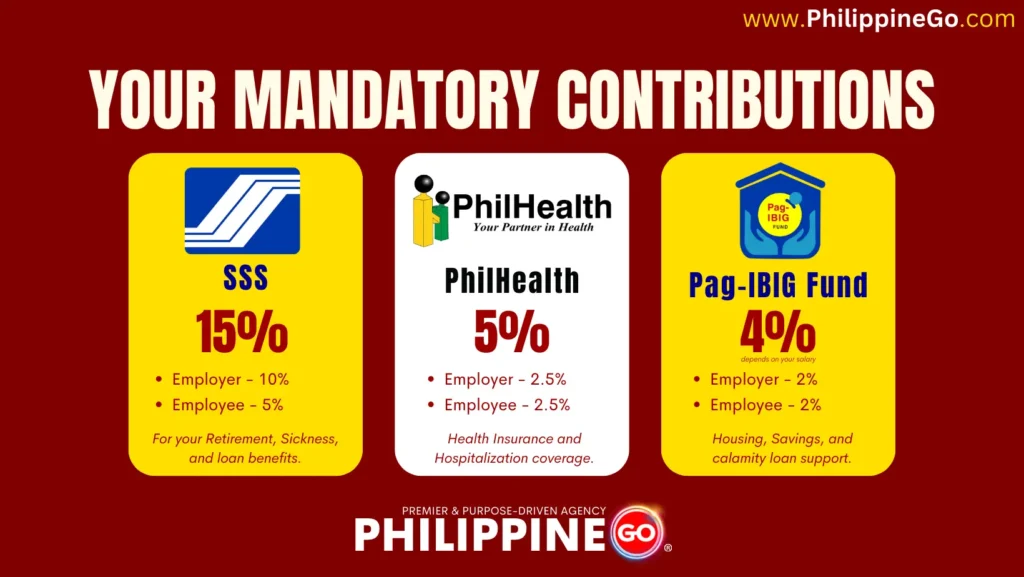
15% of your Monthly Salary Credit (MSC) up to ₱35,000.
- Employer: 10%
- Employee: 5%
When can you use it?
- Sickness or maternity leave
- Retirement pension
- Unemployment or disability
- Death benefit for your family
Read Further: What Is SSS? A Comprehensive Overview.
PhilHealth basics
What is PhilHealth for?
PhilHealth helps cover medical and hospitalization expenses. Para ito sa mga biglaang medical needs mo.
How much is deducted?
5% of your basic monthly salary, shared equally.
- Employer: 2.5%
- Employee: 2.5%
- Capped between ₱10,000 and ₱100,000 salary range.
When can you use it?
- Hospital confinement
- Maternity support
- Outpatient services
- Major illness treatments like dialysis or chemo
Read Further: What is PhilHealth? A Comprehensive Overview.
Pag-IBIG basics
What is Pag-IBIG for?
Pag-IBIG is a savings fund that helps you with housing loans, short-term loans, and even calamity loans.
How much is deducted?
It depends on your salary bracket:
- ₱1,500 and below:
- Employee: 1%
- Employer: 2%
- ₱1,500 to ₱10,000:
- Both employee and employer: 2%
- ₱10,000 and above:
- ₱200 each, fixed
When can you use it?
- Apply for affordable housing
- Borrow during emergencies
- Grow your savings with dividends
Pro Tip: The earlier you start, the more your savings grow over time.
What to Do to Track and Use Your Benefits
Now that you know where your money goes, here’s how to take full control of your benefits.
Maraming workers ang natatakot magtanong or mag-follow up sa government offices.
But once you learn how to access your accounts, makakatulong ito sa’yo in real life emergencies and long-term plans.
Where and how to log in
Want to check your contributions online?
Bago mo magawa ‘yan, kailangan mo munang gumawa ng online account sa SSS, PhilHealth, at Pag-IBIG.
Don’t worry, here’s how:
1. SSS (Social Security System)
- Start here: SSS Member Registration
- Click the “Payment Reference Number” button
- Fill in your CRN or SS number and other required details
- Provide a valid email and mobile number
- Create and remember your password
- Click “Next” to continue and complete the form
Once done, you can log in anytime to check your SSS contributions.
→ Wala ka pang SS number? Start here: How to Apply for SS Number Online | 3 Easy Steps.
2. PhilHealth
- Start here: PhilHealth Member Portal
- Click the “Create Account” button
- Enter your PhilHealth Identification Number (PIN) and other required info
- Provide a valid email and mobile number
- Set your password and keep it secure
- Click “Create Account” again to finish
After registration, you can now view your PhilHealth contributions online.
→ Not yet a member? Read this: PhilHealth Online Registration | 3 Easy Steps.
3. Pag-IBIG Fund
- Start here: Virtual Pag-IBIG Account Creation
- Click “Click here” under “Create and Activate your Account Online”
- Prepare the needed requirements
- Click “Next” and then “Proceed”
- Fill in your Pag-IBIG MID No. and personal details
- Click “Proceed” to submit your registration
Once approved, you can log in to check your Pag-IBIG contributions anytime.
→ Need to register first? Check this: How to Register Pag-IBIG Online | 3 Easy Steps.
Pro Tip: Take note of your log-in details and secure your registered mobile number and email for future recovery.
Real-life times they can save you
These accounts are more than just deductions. Here’s how they can literally save you in real-life situations.
- SSS:
- Nawalan ka ng trabaho or may emergency leave? You can apply for sickness or unemployment benefits.
- PhilHealth:
- Na-hospital ka? A big portion of your bill can be covered, reducing stress sa panahon ng emergency.
- Pag-IBIG:
- Nasiraan ng bahay dahil sa bagyo? You can apply for a calamity loan or housing support.
Recommended to Read: How to Use Your Government Benefits Wisely in 6 Easy Steps.
Final Thoughts
Your payslip may feel bitin now, pero lahat ng kaltas na ‘yan may silbi.
SSS, PhilHealth, at Pag-IBIG are not just deductions — they’re protection.
Start checking your contributions today so you’ll be ready when you need them most.
Up Next: Episode 4
Now that you know where your deductions go, it’s time to build your own safety net.

Episode 4:
- Emergency Fund – Paano Magsimula Kahit ₱100 Lang per Sweldo
In the next episode, we’ll help you start your emergency fund. Kahit ₱100 lang per sweldo, may mabubuo ka na.
References
- Republic of the Philippines Social Security System. (2019). Sss.gov.ph. https://www.sss.gov.ph/
- PhilHealth. (2024). Philippine Health Insurance Corporation. Www.philhealth.gov.ph. https://www.philhealth.gov.ph/
- Corporate Pag-IBIG Website. (n.d.). Www.pagibigfund.gov.ph. https://www.pagibigfund.gov.ph/
“Bawat kaltas mo ngayon, proteksyon mo sa tamang panahon.”
Philippine Go is with you, every step of the way.